Stop ignoring your images. Every day you let them sit without proper optimization, you’re leaving traffic and customers on the table for your competitors to grab. It’s time to learn how to write image alt text that boosts your SEO, improves accessibility, and gets your business found on Google and the new wave of AI search engines. This isn’t a “nice-to-have”-it’s a necessity for survival.
What is Image Alt Text (And Why It’s a Traffic Goldmine)
In simple terms, image alt text (alternative text) is a short, written description of an image on your website. It’s the text that appears if an image file fails to load, and it’s what screen-reading tools announce to visually impaired users. But most importantly for your business growth, it’s what search engines like Google read to understand what your images are about. If you treat it as an afterthought, you’re actively sabotaging your own rankings.
Reason 1: Dominate Google Images Search
Google is a machine. It can’t “see” the brilliant product photo or helpful infographic you uploaded. It relies on alt text to understand the context and relevance of your images. When you write descriptive, keyword-rich alt text, you tell Google exactly what your image shows, dramatically increasing your chances of ranking in Google Images-a massive source of organic traffic that your lazy competitors are probably ignoring completely.
Reason 2: Win with Accessibility and User Experience
Making your website accessible isn’t just good karma; it’s smart business. Millions of people use screen readers to browse the web. Without alt text, your images are invisible and frustrating black holes in their experience. Proper alt text ensures everyone can access your content, building brand trust and showing that you care about all potential customers. It also improves the experience for everyone when slow connections cause images to break.
Reason 3: The Secret Weapon for AI Search (ChatGPT & Perplexity)
The world of search is changing. AI engines like ChatGPT and Perplexity are becoming the new Google for millions. These platforms consume and index information differently, and they rely heavily on structured data-like alt text-to understand and feature images in their answers. Optimizing your alt text today is how you get ahead of the curve and ensure your business is visible in the AI search revolution that’s already happening.
How to Write Perfect Alt Text in 60 Seconds (Checklist & Examples)
Don’t overthink it. Writing powerful alt text is fast and easy once you know the formula. The goal is to be descriptive and helpful, not to cram in as many keywords as possible. Get this right, and you’ll be miles ahead of the competition.
The Good vs. Bad Alt Text Showdown
Let’s look at a simple example to see the difference between useless and high-impact alt text:
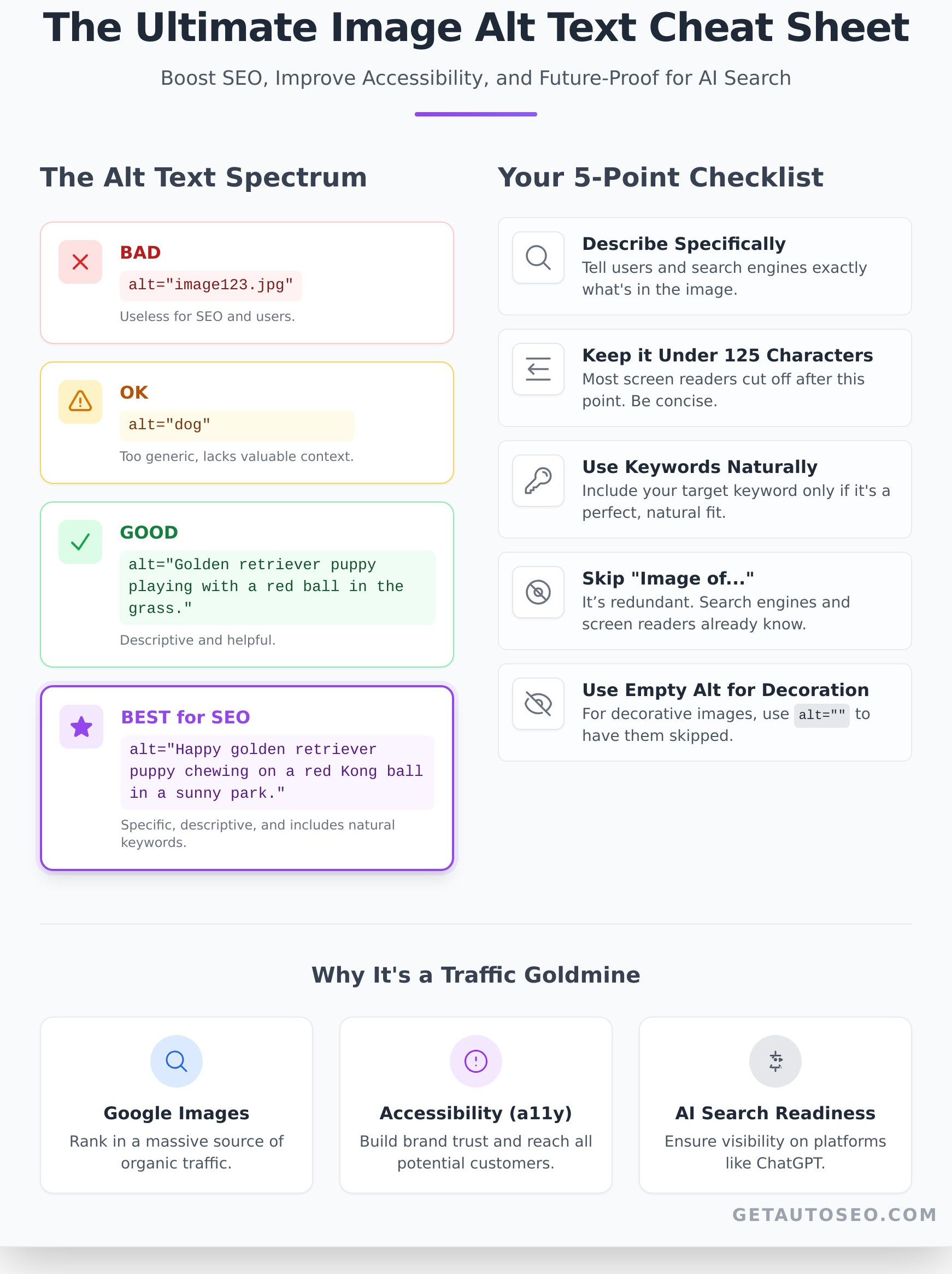
- BAD:
alt="image123.jpg"(This is completely useless.) - OK:
alt="dog"(Too generic. Offers no real value.) - GOOD:
alt="Golden retriever puppy playing with a red ball in the grass."(Descriptive and clear.) - BEST for SEO:
alt="Happy golden retriever puppy chewing on a red Kong ball in a sunny park."(Specific, descriptive, and naturally includes relevant keywords.)
This principle is even more critical for e-commerce. For a store that sells digital products, getting this right means the difference between being found and being invisible. For instance, if you were to sell digital patterns, like the ones you might find if you check out Embroidery n Sewing, your alt text would need to be very specific. Instead of alt="rose design", you’d want something like alt="Intricate red rose digital embroidery design for 5x7 hoops." This helps you attract buyers searching for exactly what you offer.
This is also true for physical products. For an online retailer like Çırağan Babel Optik, which specializes in high-end eyewear, the difference is stark. An alt text of alt="sunglasses" is a missed opportunity. A much better, traffic-driving alternative would be alt="Bottega Veneta BV1012S cat-eye sunglasses in black acetate with gold detailing."
Your 5-Point Alt Text Checklist to Crush It
- Describe the image specifically and accurately. Tell the user and the search engine exactly what’s in the image as if you were describing it over the phone.
- Keep it under 125 characters. Most screen readers cut off after this point, so keep it concise and front-load the most important information.
- Weave in your target keyword naturally. If your article is about “dog training toys,” including “golden retriever puppy chewing on a red Kong ball” is a perfect, natural fit. Don’t force it.
- Skip saying “image of” or “picture of.” It’s redundant. Search engines and screen readers already know it’s an image. Get straight to the point.
- Don’t write alt text for purely decorative images. If an image is just a background swirl or a design element, use an empty alt attribute (
alt=""). This tells screen readers to skip it.
Stop Wasting Time: Putting Your Image SEO on Autopilot
Let’s be honest. Manually going back through hundreds or thousands of images to add alt text is a soul-crushing nightmare. It’s the exact kind of slow, tedious, low-impact work that kills productivity and prevents you from focusing on actual growth. Smart business owners don’t do this. They automate it.
How to Add Alt Text Manually (The Slow Way)
In platforms like WordPress, you can click on any image in your Media Library or post editor and find the “Alternative Text” field. You then have to manually type out a description for every single image, one by one. While it’s simple for one or two images, it becomes a massive time sink and an impossible task to manage as your site grows.
The Future is Automated: Let AI Do the Work
Why would you waste hours on a task a machine can do perfectly in seconds? Modern SEO platforms use advanced AI to analyze your images and write descriptive, keyword-aware alt text instantly. This guarantees that 100% of your visual content is optimized for search engines and accessibility with zero manual effort. Our platform, AutoSEO, not only automates this but also generates daily expert articles and builds high-authority backlinks to grow your traffic while you sleep. Ready to put your entire SEO on autopilot? Start your $1 trial.
Frequently Asked Questions About Image Alt Text
What is the difference between image alt text and an image title?
Alt text is for screen readers and search engine crawlers, describing the image for accessibility and SEO. The image title is the text that often appears in a small tooltip when a user hovers their mouse over an image. Alt text is critical for SEO; the title attribute is not.
Should every single image on my website have alt text?
Every image that conveys information should have alt text. This includes product photos, infographics, team headshots, and diagrams. The only exception is for images that are purely decorative (like background textures or abstract shapes), which should have an empty alt attribute (alt="").
How long should image alt text be for SEO?
Aim for conciseness, ideally under 125 characters. This ensures screen readers can read the entire description without cutting it off. Be descriptive but don’t write a novel.
Is it okay to use my main keyword in the alt text for every image?
No. This is keyword stuffing and can get you penalized. Only use your keyword if it accurately describes the image. Use variations and related terms for other images to provide context without spamming.
Can AI really write good alt text automatically?
Absolutely. Modern AI is incredibly advanced at recognizing objects, scenes, and context within an image. An automated SEO platform can generate alt text that is often more descriptive and consistent than what a hurried human would write, saving you hundreds of hours.
You now know more about image alt text than 99% of your competitors. But knowledge without action is useless. Every day you wait, you’re letting valuable traffic slip through your fingers. Stop leaving growth to chance and start taking control. Trusted by over 527 businesses and delivering an average traffic increase of 216% in just 6 months, AutoSEO is the engine your business needs to win. Stop losing traffic. Put your entire SEO on autopilot with a $1 trial.