You’re told SEO is complicated. That you need to master dozens of technical details to even have a chance. One of those “details” is meta tags. You spend hours trying to figure out which ones matter, how to write them, and where to put them. Stop guessing. This guide reveals the critical meta tags that actually drive clicks and rankings-and how to put the entire process on autopilot.
What Are SEO Meta Tags? (And Why They’re a Waste of Your Time)
Let’s cut through the jargon. Meta tags are tiny snippets of code that live in the background of your webpage. They don’t show up on the page itself, but they tell search engines like Google critical information about your content. Think of them as the digital billboard for your page in the crowded marketplace of search results. When done right, they grab attention and win clicks.
But here’s the brutal truth: writing them manually for every single page, every blog post, every product is a slow, repetitive, soul-crushing task. It’s 2026. While you’re sweating over character counts, your competitors are automating this. Every minute you waste on manual tasks is a minute they get further ahead.
The 3 Meta Tags That Drive 99% of Your Results
The internet is filled with lists of a dozen or more meta tags you “need” to know. It’s noise designed to make SEO feel complicated. The reality is simpler. You only need to focus on these three. Ignore the rest and you will be miles ahead of the competition who are still stuck in the weeds.
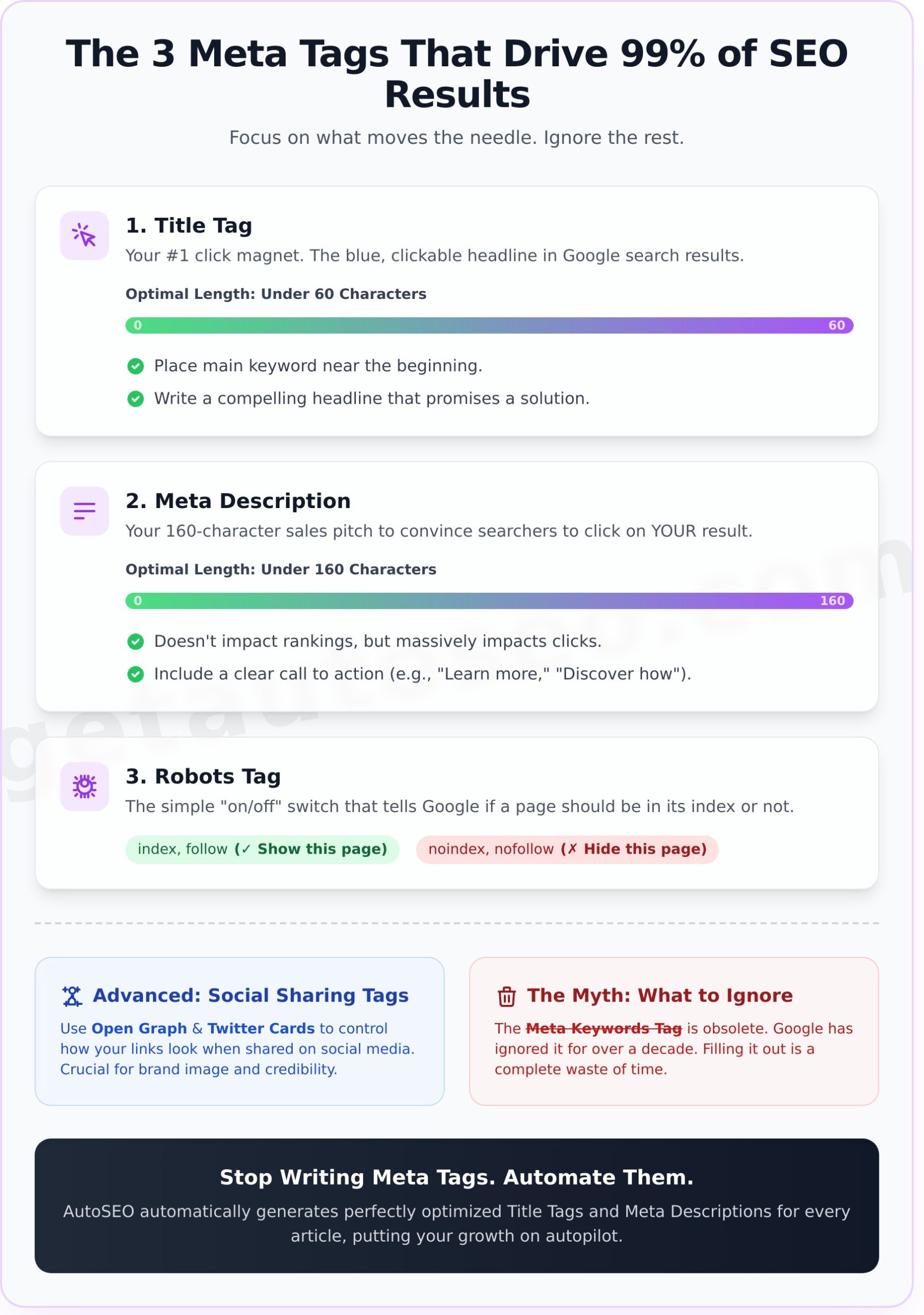
- 1. Title Tag: This is your #1 click magnet on Google. It’s the blue, clickable headline in the search results.
- 2. Meta Description: This is your 160-character sales pitch that appears under the title.
- 3. Robots Tag: This is the simple on/off switch that tells search engines whether to index your page or ignore it.
Title Tag: How to Write Headlines That Win Clicks
If you get one thing right, make it this. The title tag is the single most important meta tag for SEO. It’s your first, and often only, chance to convince a searcher to click on your result instead of the nine others on the page.
- Keep it under 60 characters. Any longer and Google will cut it off, making you look unprofessional.
- Place your main keyword near the beginning. This tells Google and users exactly what your page is about, instantly.
- Make it compelling. Don’t just state a keyword. Ask a question, create urgency, or promise a solution to beat the competition.
Meta Description: Convince Searchers to Choose You
While the meta description doesn’t directly impact your rankings, it has a massive impact on your click-through rate. A great description can steal clicks from pages ranking above you. Think of it as free ad copy for your page in the search results.
- Stay under 160 characters. This is your sweet spot to get your full message across without it being truncated.
- Include a call to action. Don’t just describe the page; tell the user what to do next. Use phrases like “Learn more,” “Discover how,” or “Shop now.”
Advanced Meta Tags: Look Good Everywhere
Once you have the basics on lockdown, a couple of other tags can give you a significant edge. These are less about ranking on Google and more about controlling how your brand and content appear across the entire web, especially on social media.
Open Graph & Twitter Cards: Dominate Social Sharing
Ever wonder why some links look beautiful and professional when shared on Facebook, LinkedIn, or X (formerly Twitter), while others look broken and ugly? The answer is Open Graph and Twitter Card tags. These tags let you specify the exact title, description, and image that should appear. Without them, these platforms take a wild guess at what to show-and they often get it wrong, killing your credibility before anyone even clicks.
The One Meta Tag to Ignore: The Meta Keywords Myth
Let’s be perfectly clear: the meta keywords tag is obsolete, dead, and a complete waste of your time. Google has officially ignored it for over a decade because it was spammed to death. If you see an “SEO expert” telling you to fill it out, run. Stop wasting precious minutes on it and focus on what actually moves the needle.
The New Rule: Stop Writing Meta Tags. Automate Them.
The old way of doing SEO involved staring at a spreadsheet, manually writing tags for every single page on your website. It was tedious, inefficient, and impossible to scale. The new rule is simple: stop writing meta tags and automate them. Let intelligent systems do the heavy lifting so you can focus on what you do best-running your business.
How AutoSEO Puts Your Meta Tags on Autopilot
This is where the game changes. AutoSEO doesn’t just write a daily, expert-level article for your site. It automatically generates the perfectly optimized title tag and meta description for every single post. There’s no more guesswork. No more character counting. No more wasted time.
You get SEO results that drive traffic and customers while you sleep. Your competitors are already doing this. Every day you wait is another day you fall further behind. It’s time to catch up and blow past them. Start your $1 trial and let AI handle your SEO.
Frequently Asked Questions
Are meta tags still important for SEO in 2026?
Yes, but only a few of them. The title tag is critical for rankings and clicks. The meta description is crucial for attracting users to click on your result. Open Graph tags are essential for social media. The rest are mostly noise.
How do I add meta tags to my WordPress website?
You can use an SEO plugin like Yoast or Rank Math to add them manually to each page. However, a far more efficient method is to use an automated platform like AutoSEO, which generates and implements them for you with every article it creates.
Can AI write good meta tags that get clicks?
Absolutely. Modern AI is specifically trained on massive datasets of high-performing content. It can analyze a topic and generate compelling, keyword-rich titles and descriptions designed to maximize click-through rates, often outperforming human writers who lack SEO expertise.
What is the ideal length for a title tag?
The ideal length is under 60 characters. This ensures your full title is visible on both desktop and mobile search results, preventing it from being awkwardly cut off by Google.
What happens if I don’t write a meta description?
If you don’t provide a meta description, Google will pull a snippet of text from the page that it thinks is relevant to the user’s query. This is often a random sentence fragment that does a poor job of selling your page, resulting in fewer clicks.
Stop letting your competitors win the click. While they are bogged down in manual tasks, you can have a fully automated system generating content and perfectly optimized meta tags every single day. With a 216% average traffic increase seen by our 527+ business users, the results speak for themselves. It’s time to put your growth on autopilot. Stop Wasting Time. Automate Your SEO for $1.